Let AI sign in without seeing your password
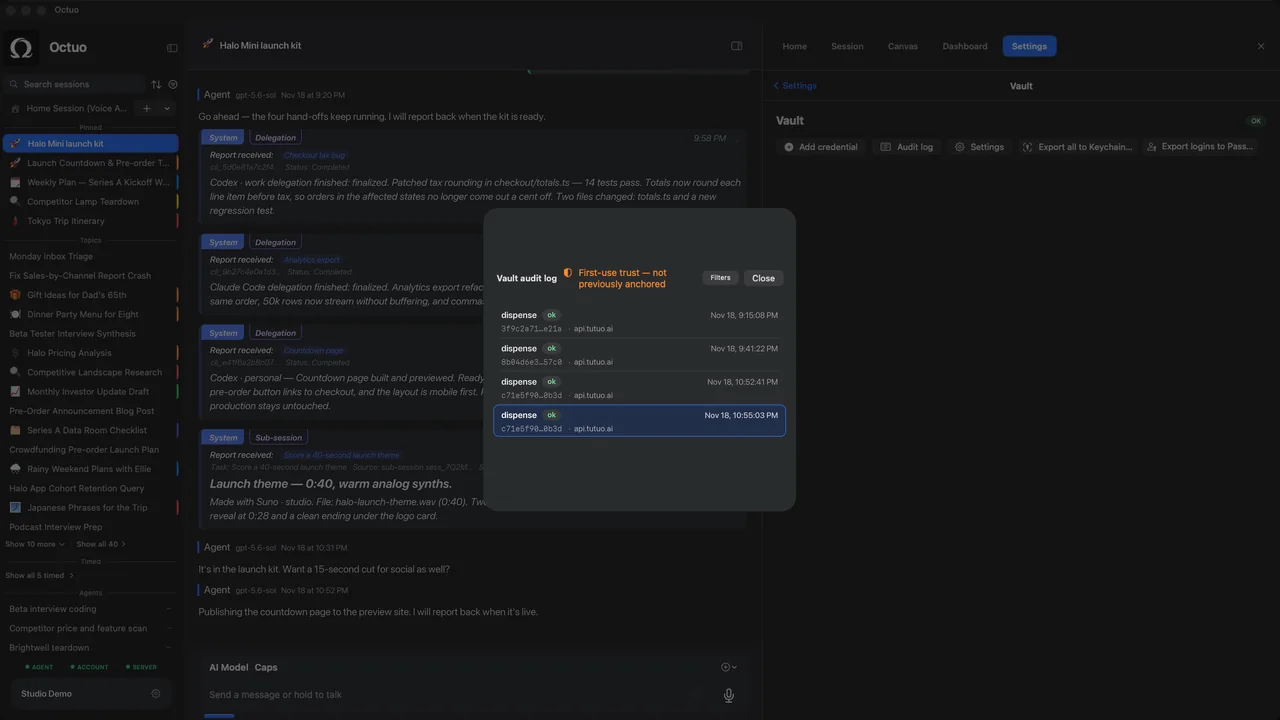
You ask an AI to pull this month's invoices from a supplier portal, and its first reply is a request for your password, to be pasted into the chat box. With Octuo, you put the credential in an encrypted vault, and the language model never sees it. When a job needs the login, Octuo uses it, and each use leaves an entry in a log you can read.
What Octuo does at that moment
- You state the goal in plain words: collect the invoices, check the booking, update the listing. Octuo prepares the job, works in the browser under your control and follows it through.
- The credential stays in the vault. Credentials live in an encrypted Secrets Vault, and the language model never sees raw credentials. Octuo uses them when a job needs them.
- Every use is written down. Each use of a credential in the vault goes into an audit log, so what was used is something you can read back later rather than take on trust.
- You grant the permissions. The work stays inside the access you give Octuo.
- You step in only where it has to be you: your own sign-ins, a verification code, an approval, and payments. Octuo handles the work around those moments, and it tells you when a job is done or needs a decision.
If you want a habit to go with this, hand over access, not secrets is a short read.
Three examples
These are illustrative situations, not customer stories.
Invoices from a supplier portal
A small-shop owner asks Octuo to collect this month's invoices from a supplier portal. The first time, they save the portal login in the vault and do the first sign-in themselves where the site asks for it. After that, Octuo does the clicking and brings the results back to the conversation. If the portal asks for a verification code, that request comes to the owner, because the code is theirs to give.
A booking status behind a login
A freelancer arranging travel for a client's event wants to know where a booking stands on a provider's page that sits behind a login. They ask Octuo to check and report. Octuo signs in with the credential from the vault, reads the status and tells them what it found. A CAPTCHA or a one-time code, if the site shows one, stays with the freelancer. Later they can open the audit log and see that the use was recorded. For work that only lives in a browser tab, this walkthrough covers the handoff itself.
A listing in a vendor dashboard
A cafe owner wants the holiday opening hours changed in a listing on a vendor dashboard. They give Octuo the new hours. Octuo prepares the edit, and before anything is submitted the approval lands in Attention, where the owner decides. The password never passes through the model, and the audit log shows the credential's use afterwards.
What it does not do
Octuo does not remove your own two-factor codes, CAPTCHAs or approvals, and it cannot promise that a given site allows automated access: each site's terms apply. It works within the access you grant, and a vault does not make a stolen password harmless, so if a password leaks somewhere else, change it as you normally would.
FAQ
Does the AI ever see my password? The language model never sees raw credentials stored in the vault. Octuo uses them when a job needs them. A password you type into a chat message never went through the vault, so put credentials there instead. Our five questions before you click Allow is a useful companion.
What does "every use is logged" mean in practice? Each time Octuo uses a credential in the vault, an entry is written to an audit log that you can read. You can open the log afterwards and see when your logins were used.
What if the site asks for a verification code? That step stays yours. Octuo does the surrounding work and brings the request to you, and you supply the code, the CAPTCHA or the approval. Octuo does not go around a step that has to be yours.
Octuo is in public beta on macOS and web, and an iPhone app is coming soon. New accounts get 1,000 OC trial credits, once per person, no card.