Running work across more than one tool account: a practical setup
Publicado originalmente em WordPress em 3 de outubro de 2026.
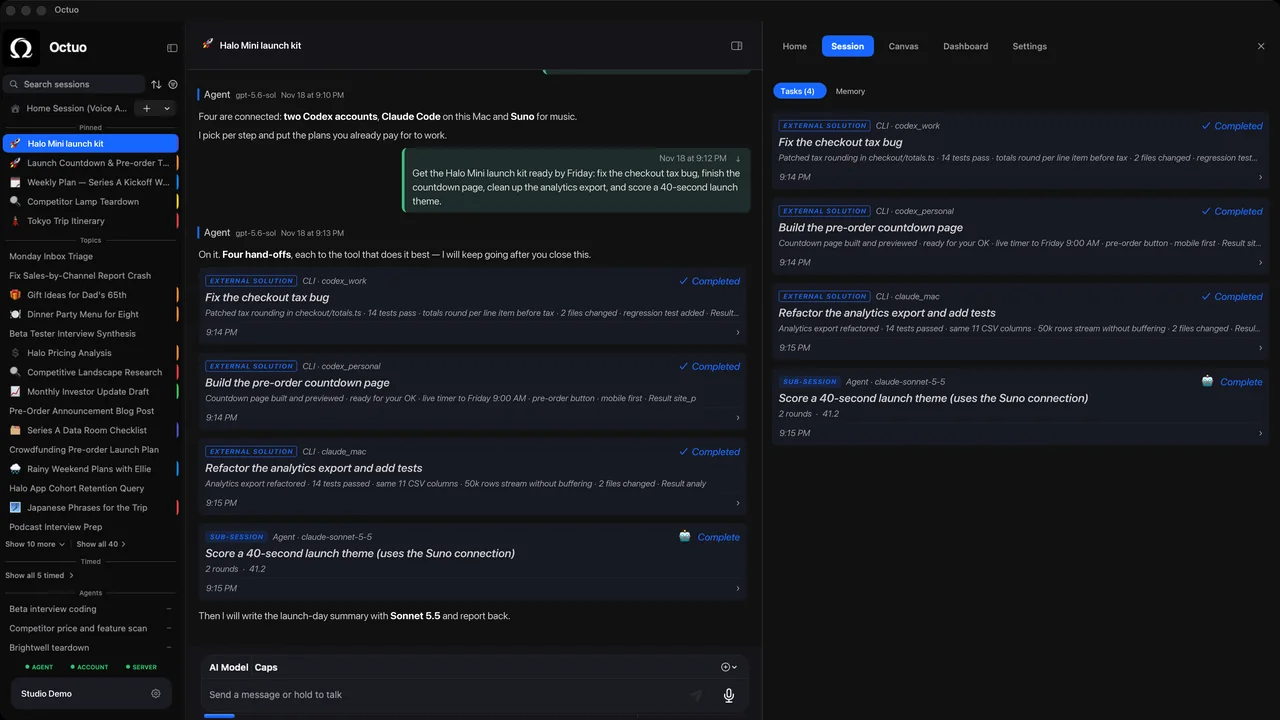
Here is a scene. It is hypothetical and illustrative. An operations lead has a month-end report to ship on Friday. One tool account is reconciling a batch of expense lines. A second is drafting the summary. A third is sorting open questions into “must fix”, “can wait” and “needs a decision”. Three accounts, one report, three places to look.
The accounts are the easy part. Keeping them pointed at one goal is the work. Here is a setup that applies to any set of tools, and then where Octuo fits.
Step 1: Decide who does what.
Write one line per account: the job it has and why it’s the right one. If two accounts could do the same job, pick one and note why. Each service has its own terms and usage limits, and those still apply.
Step 2: Authorize deliberately.
Connect only what you intend to use, and give each the minimum access its job needs. Keep credentials out of documents and chat windows. In Octuo you grant the permissions, and credentials live in an encrypted Secrets Vault the language model never sees.
Step 3: Write each task with its context.
Goal, files, decisions already made, constraints, definition of done. Separate accounts generally mean separate histories, so the context has to travel with the task. This is the step that’s easiest to skip.
Step 4: Track progress in one place.
For each task: running, waiting or done, and what it is waiting on. If the tracking lives in your head, every interruption costs you a rebuild.
Step 5: Gather results where you’ll see them.
Pick the landing place before the work starts, for example one folder or one summary where each account’s output lands, with what was done and what needs a decision.
Step 6: Review, then reassign.
When a task returns, accept it, send it back, or move the next piece to a different account or tool. That is the point of coordinating: you decide where the next piece goes.
Where Octuo fits
Octuo is a personal assistant and one starting point for work across AI, tools and specialist services. It’s built to carry out steps 3 to 5 for the supported tools and services you connect and authorize, including external tools such as Claude Code and Codex, which we name only as examples of tools Octuo can hand work to (no partnership or endorsement is implied). It assigns tasks, carries the context each one needs, tracks progress and gathers results. It isn’t a sync of each tool’s native chat history, and each service’s own terms and usage limits still apply. You choose the models and the tools; Octuo coordinates.
Making better use of existing subscription allowances is part of the value, with the potential to lower task costs. Savings aren’t guaranteed, and external subscriptions and Octuo usage are separate costs. Octuo is available for macOS.