What is an AI agent orchestrator, and do you need one for personal use?
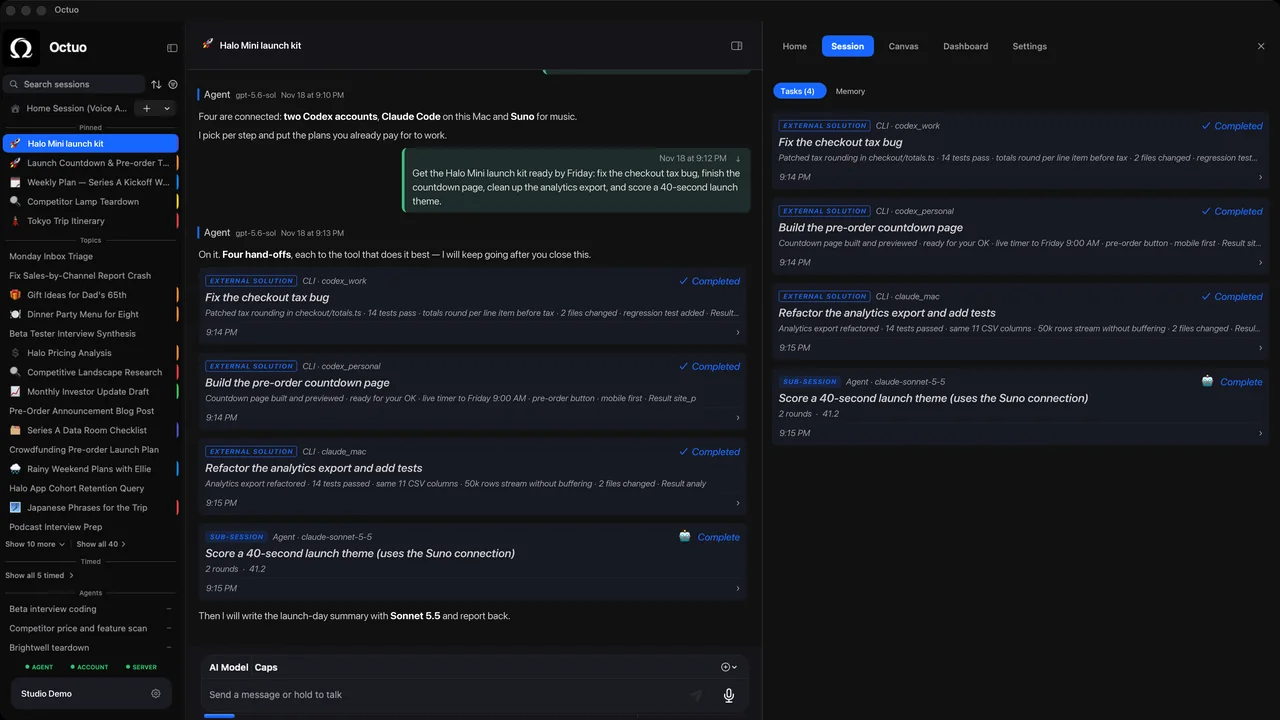
An AI agent orchestrator is a layer that takes one goal, hands the pieces to the right tools or agents, passes along the context each one needs, tracks the runs and gathers the results. For personal use, you need one when you are the go-between for several tools every week. With one or two tools, a checklist is enough.
How is an orchestrator different from an agent or a chatbot?
- A chatbot answers you in a conversation.
- An agent carries out a task with tools: it reads files, runs commands or works in a browser. Coding agents such as Claude Code and Codex are examples.
- An orchestrator sits above the agents. It decides which tool gets which piece, keeps the thread between them and reports back.
Names are used loosely, and a personal orchestrator is often just called an assistant. Judge it by what it does: whether it coordinates other tools, not only answers.
Do I need one for personal use?
Run a one-week tally. Each time you do one of these, make a mark:
- copy context from one AI tool into another;
- re-explain the same background to a tool that has not seen it;
- wait for one run only to carry its output to the next tool;
- forget which run is waiting on you.
A handful of marks means a note file and a brief template will do. Marks every day mean the coordination itself has become a job, and that job is what an orchestrator is for. If you use one tool, the tally will stay empty, and that is a fine answer.
What can I do by hand before adding software?
Four habits get you most of the way:
- One brief template. Goal, context, constraints and a line that says what "done" looks like.
- One landing place. Decide where results arrive before work starts, such as one folder or one running summary.
- One status list. For each task: running, waiting or done, and what it is waiting on.
- One rule for what stays yours. Sign-ins, payments and approvals that must be yours.
Our posts on running work across more than one tool account and on seven questions before you connect a tool go deeper on the first three.
What should a good personal orchestrator do?
Use this as a checklist for any product, including ours:
- It takes a goal, not a script of clicks.
- It hands work to the tools you already use instead of replacing them.
- It carries the context each task needs, so you do not retype it.
- It shows progress without making you watch.
- It brings results back to one place.
- It asks you only where the decision must be yours.
- It shows what it costs, including charges outside the assistant.
We wrote more about this in what a "starting point" for AI and tools should actually do.
Where Octuo fits
Octuo is a personal assistant that coordinates your AI tools, agents and outside services for you: you say the goal, and it handles the preparation, delegation and follow-up.
Give Octuo a goal. It delegates work to supported tools and agents, carries the context they need and brings the results back. That means supported tools, not every tool already integrated. Octuo follows the work and reports back. Progress is there whenever you want to check; decisions that need you come to Attention. You step in for your own account sign-ins, payments and sensitive approvals that must be yours; Octuo handles the surrounding work.
Octuo is a native Mac app. See what Octuo does, or watch the demo video. New accounts get 1,000 OC trial credits, once per person, no card. OC stands for Octuo Credits.
FAQ
Is an orchestrator the same as an AI agent? No. An agent does a task with tools. An orchestrator coordinates several agents and tools around one goal, and may use agents as its workers.
Does an orchestrator replace the tools I already use? It should not. A good one hands work to your existing tools and brings the results back, so you keep the tools you chose.
Is this only for developers? No. Coding agents are the most common example, but the same pattern applies to research, documents, images and recurring chores, as long as each tool can be given a clear task.