How can I see what an AI agent is doing on my Mac?
Look in four places: the agent's own prompts and output, the files it changed (git diff), the processes it started (Activity Monitor), and the permissions you granted (System Settings, Privacy & Security). For jobs you don't want to watch, ask for a status line while it runs and a short report when it finishes.
What can I see in the agent itself?
Start with the tool's own controls. Claude Code shows a permission prompt that describes what it is about to do, and /permissions lists the rules in force and the settings file each one comes from. Codex has an approval policy, which sets when it pauses for you, and a sandbox mode, which sets file and network access; both live in its configuration.
Treat any "don't ask again" choice as a standing permission. Review those rules now and then, the way you would review app permissions.
How do I see what changed on disk?
Work on a branch or a separate git worktree, so the agent's changes stay apart from yours. Then:
git statusshows which files were touched.git diffshows exactly what changed.git logshows what was committed.
Read the tests first and the agent's summary last; our post on reviewing an agent's diff gives the order. For files outside a repository, copy them before the agent starts.
How do I see what is running?
Open Activity Monitor. It lists the processes on your Mac with their CPU and memory use, and you can search by name. Choose View, then All Processes, Hierarchically, to see which processes belong to others, such as commands launched by an agent's shell. A process that keeps working after the agent says it is finished is worth a look.
How do I see what an agent is allowed to do?
Open System Settings, then Privacy & Security. Screen & System Audio Recording and Accessibility each list apps and let you turn access on or off for each one. Apple's guidance is to grant access only to apps you know and trust, because what they do with it is governed by their own terms and privacy policies. Our post on five questions to ask before you click Allow helps you decide.
What about jobs I don't want to watch?
Ask for three things up front. A status you can read at a glance (running, waiting on you, done). A final report that lists what changed and what needs your decision. A rule for what may interrupt you. Our post on telling stuck from slow covers what to check before cancelling.
Where Octuo fits
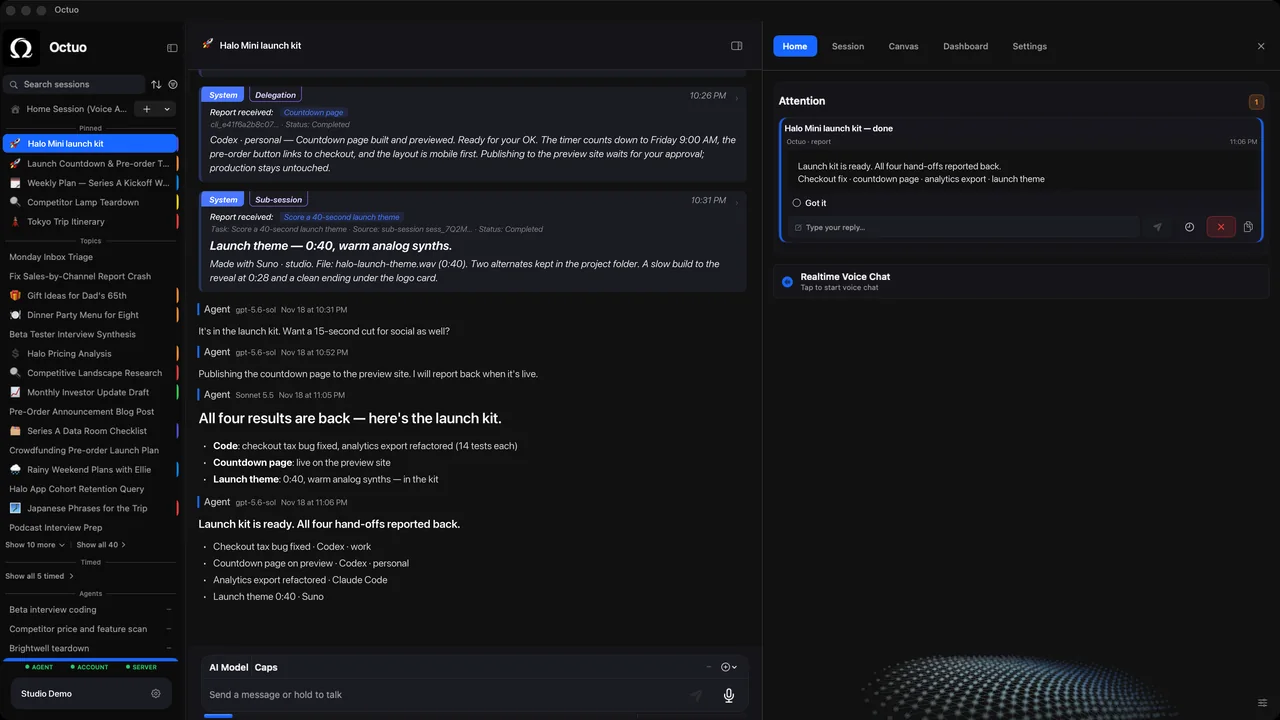
Octuo follows the work and reports back. Progress is there whenever you want to check; decisions that need you come to Attention. It has a dashboard, sessions and the Attention inbox, so checking in is optional, not a new chore.
Credentials live in an encrypted Secrets Vault: the language model never sees raw credentials, and every use of a credential is written to an audit log. On first launch macOS asks for Screen Recording and Accessibility permissions, and whether to grant them is your call. You step in for your own account sign-ins, payments and sensitive approvals that must be yours; Octuo handles the surrounding work.
It is not a full prompt or reasoning viewer. See what Octuo does.
FAQ
How do I limit what an agent can do?
Grant the minimum. Review the tool's own rules (/permissions in Claude Code, approval policy and sandbox mode in Codex), then check the Screen & System Audio Recording and Accessibility lists in System Settings.
Does Octuo show every step of the model's reasoning? No. It shows progress, sessions and decisions that need you, plus an audit log of credential use. It is not a complete prompt or internal-reasoning viewer.
Do I have to watch an agent while it works? No. Ask for status states and a final report, then check at times you chose. Visibility is there when you want it.
Sources
- Claude Code docs, "Configure permissions": https://code.claude.com/docs/en/permissions (accessed 2026-10-17)
- Codex docs, "Advanced Configuration", sections "Approval policies and sandbox modes": https://learn.chatgpt.com/docs/config-file/config-advanced (accessed 2026-10-17)
- Apple Support, "View information about Mac processes in Activity Monitor": https://support.apple.com/guide/activity-monitor/view-information-about-processes-actmntr1001/mac (accessed 2026-10-17)
- Apple Support, "Control access to screen and system audio recording on Mac": https://support.apple.com/guide/mac-help/control-access-screen-system-audio-recording-mchld6aa7d23/mac (accessed 2026-10-17)
- Apple Support, "Allow accessibility apps to access your Mac": https://support.apple.com/guide/mac-help/allow-accessibility-apps-to-access-your-mac-mh43185/mac (accessed 2026-10-17)
The product names above belong to their owners. We have no affiliation with them.