Describe the little app you wish existed
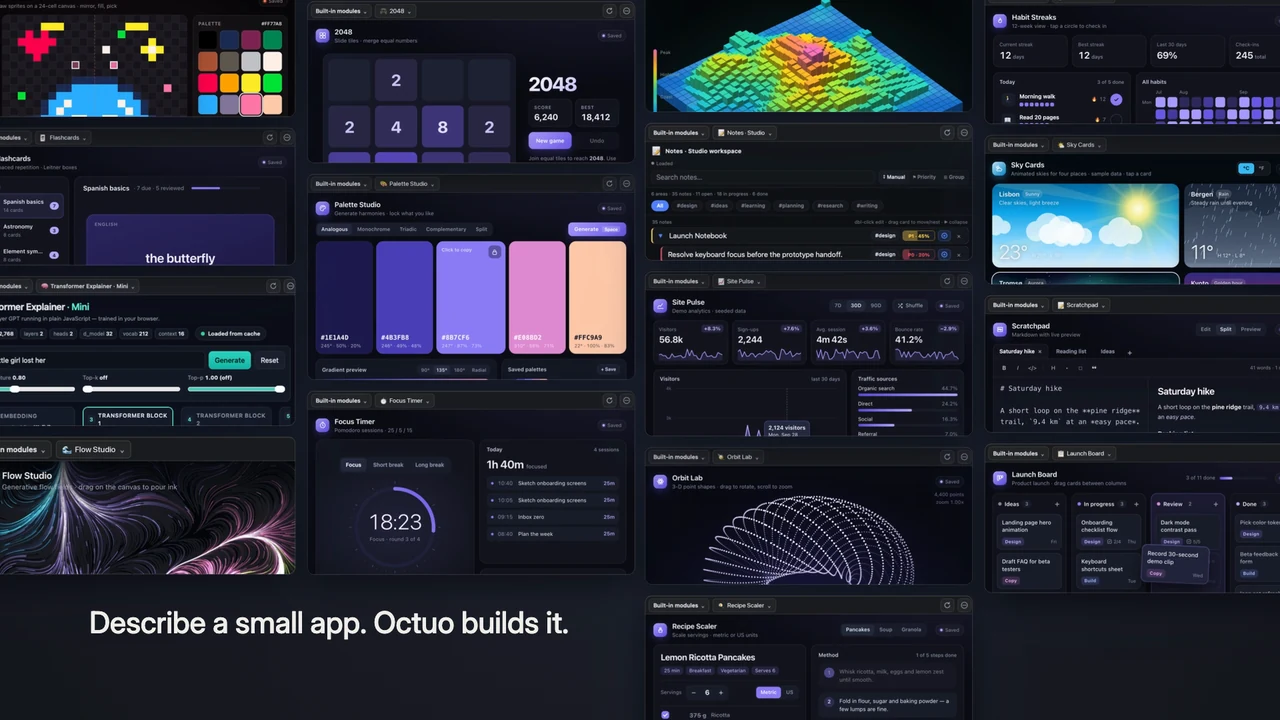
It is Sunday evening, and you are rebuilding the same weekly task tracker in a spreadsheet for the fifth time, because no app you have found fits the way you actually work. With Octuo you describe that tool in a few plain sentences, and it builds a small app for you on your Canvas. The app stays there, so you use it again tomorrow and the day after, next to the rest of your work.
What Octuo does at that moment
- You describe the app the way you would to a colleague: what it should keep track of, what you want to see, what you tick off.
- Octuo builds it as an interactive app on the Canvas, so you get a working tool and not just a block of text in a chat box.
- The app is built in a sandbox and stays on your Canvas, ready to open the next time you need it.
- Octuo can see and operate the Canvas it builds on. The Canvas also holds built-in modules such as memory and notes, so your own app sits alongside them.
- If the first version is not quite right, you say what to change and Octuo adjusts it. If a job ever needs your own account sign-in, a payment or a sensitive approval, that stays with you; Octuo handles the work around it.
Three examples
These are illustrative situations, not customer stories.
A freelancer's Friday review
A freelancer keeps rebuilding the same Friday review in a spreadsheet: what went out, what is waiting on a client, what moves to next week. She asks Octuo for a small tracker with those three lists and one line for the first thing to do on Monday. A first version appears on her Canvas, she reads it over and asks for the lists in a different order. The next Friday she opens the same app instead of starting a new sheet. If you want to plan one before you ask, we wrote about designing a small app before you ask for it.
A teacher's quiz tool
A teacher describes a quiz tool in two sentences: questions go in with their answers, and in class the teacher steps through them one at a time. Octuo builds it, the teacher tries it with a few sample questions and then uses it with the class. The following week, new questions go into the same tool. The teacher decides what goes in, and keeps student names and marks out of it.
A shop's restock checklist
The owner of a small shop writes down what she wants: a list of items running low, a box to tick once a supplier has been contacted, and a note for when the delivery is due. Octuo builds the checklist on her Canvas. On Monday morning she works through it, and when she places an order on a supplier's portal, signing in there is her own step. By the next Monday the checklist is still on the Canvas, ready for the new week. Our post on four sentences that turn an idea into a small app shows one way to word a request like hers.
What it does not do
These are small tools for your own use on your own Canvas, not products you publish or sell, and they do not replace professional software when a job calls for it. Octuo may not get an app right on the first try, which is why asking for changes is part of the process. Keep student names, grades and other sensitive records out of a tool like the quiz app.
FAQ
Do I need to know how to code? No. You describe what you want in plain words and Octuo builds it. You do not write the app yourself.
Where does the app live, and will it still be there next week? It lives on your Canvas, which is where Octuo builds it, and it stays there for you to open again. Canvas apps are built in a sandbox.
What if it builds the wrong thing? Say what is off and ask for the change, the same way you asked for the app. The first version may not match what you pictured, so expect to ask for adjustments.
See what Octuo does. Octuo is in public beta on macOS and web, and an iPhone app is coming soon. New accounts get 1,000 OC trial credits, once per person, no card.